Hot Article
- Centos7 closes and restarts the system firewall and opens firewall ports
- How IID server uses Xshell to connect to Linux (centos) server
- BT panel forgets the background login URL, and the solution to the security entrance verification failure
- What to do if a cp: omitting directory error occurs in Linux (detailed solution)
- How to confirm whether the ip is blocked or polluted?
- How to change pycharm to Chinese (pycharm set Chinese detailed tutorial)
Windows remote connection server setting local disk sharing tutorial
- Author:Kevin
- Category:Network related
- Release Time:2022-12-24
When using Windows to remotely connect to the server, many users find that the local disk cannot be used on the server after the connection (the local disk cannot be found), this is because you did not set it when you were on the remote server How to enable this disk sharing function? Come and take a look at the detailed tutorial of IDGlobal~< /p>
Detailed tutorial on setting up local disk sharing for Windows remote connection server:
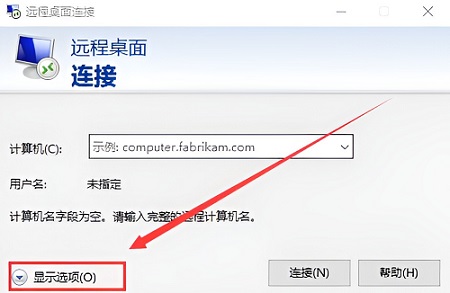
1. In the opened remote desktop window, click “ShowDisplayOption >”.
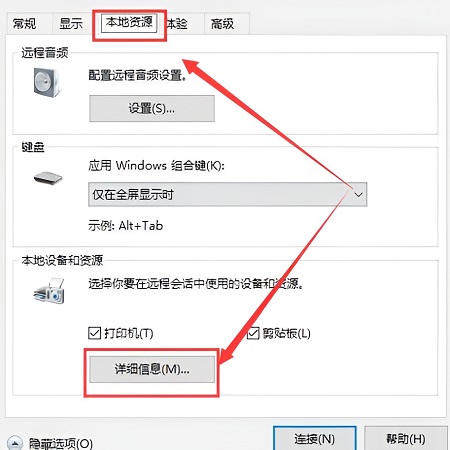
2. Then switch to the “Local Resources” tab, and click “Details” at the bottom.
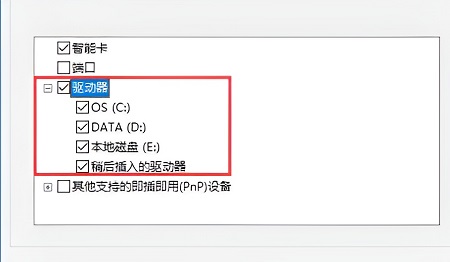
3. Expand the item “Drive”, and check all the options.